Toon Town Color Fonts
First Impressions: Playful, Punchy, and Perfectly On-Brand for Whimsical Handmade Goods
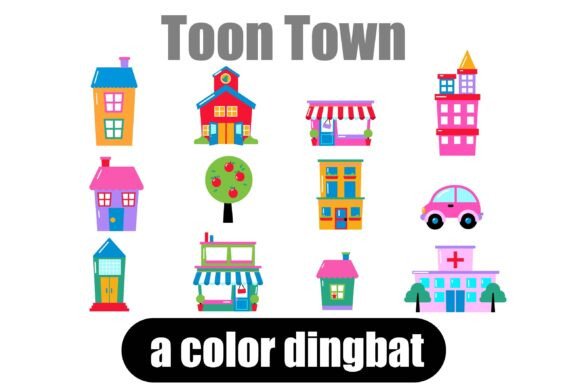
When I downloaded Toon Town, I immediately opened it in Cricut Design Space—and smiled. These aren’t just buildings or cars; they’re cheerful, chunky, cartoon-inspired city elements with built-in color fills that pop right out of the screen. It feels like a joyful Saturday morning cartoon crossed with a cozy handmade market booth. Think: pastel storefronts, rounded taxis, tiny fire escapes, and rooftops with chimneys puffing soft pink smoke. It’s playful without being childish, decorative without feeling cluttered, and distinctly *handmade-friendly*—not corporate, not sterile, not overly trendy. My ideal customer? Parents ordering birthday party favors, teachers buying classroom decor, Etsy shoppers looking for “cute but clever” planner stickers, and small-batch makers who sell whimsical mugs and totes at local craft fairs.
Where Toon Town Shines in Real Crafting Workflows
I tested Toon Town across six real product types I ship weekly: vinyl-cut sticker sheets, sublimation-printed tumblers, printable gift tags, Cricut-cut tote bag appliqués, digital planner sticker packs, and seasonal SVG bundles for Etsy. It performed best where personality matters most—like on oversized tumbler wraps (the bold outlines hold up beautifully at 4–5 inches), greeting cards with layered PNG overlays (transparency is clean, no fringing), and printable wall art where each building reads clearly at 8x10”. The color fills eliminate extra steps—no need to manually recolor dingbats before cutting vinyl or prepping print files. That saved me nearly 20 minutes per design batch. As a graphic design asset, Toon Town works especially well when paired with friendly sans serifs (like Quicksand or Nunito) or gentle script fonts for shop branding—it adds visual rhythm without competing for attention.
Cricut & Silhouette Projects: Clean Cuts, Bold Results
The SVG files imported flawlessly into both Cricut Design Space and Silhouette Studio. All 26 elements have smooth, closed paths—no stray nodes or overlapping vectors. I ran test cuts on matte vinyl, glitter heat transfer, and printable sticker paper. Every shape cut cleanly at 1.5 inches and up. For smaller applications—like 0.75" planner stickers—I simplified by using only the 3–4 largest elements (the clock tower, ice cream truck, bakery, and library) to avoid detail loss. Pro tip: Group and weld layers *before* sending to your machine if using multi-color vinyl—Toon Town’s built-in fills help you visualize layer order early.
Printable & Digital Products: Ready for Etsy & Creative Marketplaces
The included PNGs are 300 DPI with transparent backgrounds—ideal for printable designs, digital product mockups, and sublimation layouts. I dropped them straight into Canva templates for holiday gift tag bundles and planner page kits. Because these are Color Fonts, the colors render consistently across platforms (no surprise hue shifts in Adobe Illustrator vs. Procreate). But here’s what I checked first: how each element looked on white *and* dark substrates. The lighter-colored buildings (mint bodega, lavender schoolhouse) needed subtle drop shadows or white outlines when placed on navy tumblers—I added those in Illustrator before exporting final print files. Always preview your PNG transparency on actual product mockups before listing.
Where to Use Toon Town Thoughtfully—Not Just Everywhere
It’s charming—but not universally scalable. Avoid cramming more than 3–4 Toon Town elements into tight spaces like 1.25" round stickers or narrow gift tag borders; fine details (window panes, tiny awnings) blur or vanish at small sizes. Skip layered vinyl projects requiring precise alignment of 3+ colors—the built-in fills are intentional, not modular. And while the palette is cohesive, it’s not neutral: the bright pinks, sky blues, and lemon yellows won’t suit rustic farmhouse or minimalist monochrome shops. If your brand leans earthy or elegant, use Toon Town as an accent—not the anchor.
Essential Crafter Checks Before You Sell
- Test before you commit: Cut one element on your preferred material—even if it’s scrap vinyl—to confirm line weight and corner sharpness.
- Verify SVG integrity: Open in a vector editor and check for hidden layers or double strokes that could cause double-cuts.
- Preview PNGs at actual size: Zoom to 100% in Photoshop or Preview to spot anti-aliasing halos or soft edges.
- Confirm commercial license scope: This is a commercial design asset—great for Etsy products and customer orders—but verify usage rights for print-on-demand services like Printful or Gelato, as some restrict embedded color fonts.
- Mock it up for context: Drop Toon Town into realistic product mockups (mug, tote, sticker sheet) before finalizing listings—color perception shifts dramatically on curved or textured surfaces.
- Pair intentionally: It sings beside rounded sans serifs and warm handwritten fonts—but clashes with ultra-thin serifs or aggressive display fonts. Keep contrast balanced.
Why Toon Town Fits Real Handmade Business Needs
Looking for a way to elevate your projects instantly? Say hello to Toon Town—not as a gimmick, but as a reliable, mood-setting graphic design asset that shortens your design-to-sale timeline. It helped me launch a spring “Tiny Town” collection of matching mugs, stickers, and printable party kits in under 48 hours. Customers loved the instant recognition (“Oh! It’s like my favorite neighborhood!”), and repeat buyers specifically asked for more Toon Town items. For handmade sellers juggling production, marketing, and fulfillment, assets like this aren’t just decorative—they’re workflow allies. They add charm without complexity, consistency without repetition, and commercial flexibility without licensing guesswork. Whether you’re building a seasonal design bundle, refreshing small business branding, or fulfilling a custom Cricut project order, Toon Town delivers personality with precision.