Loli-dolly Color Fonts: A Chunky Rainbow Font for Digital Sellers
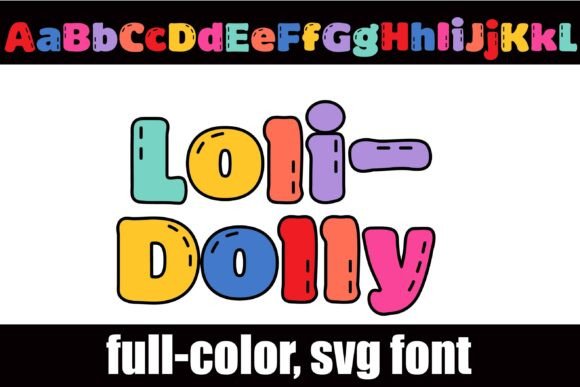
As someone who’s launched over 200 digital product listings across Etsy, Creative Fabrica, and Shopify—and shipped thousands of printable designs—I opened Loli-dolly expecting a playful font, but what I found was a surprisingly versatile graphic design asset with real commercial legs. It’s a full-color, chunky sans serif built around a vibrant rainbow palette, each letter subtly detailed with hand-stitched texture marks. There’s also an alternate character set—different color variations per glyph—that you access via OpenType features in compatible apps like Illustrator, Affinity Designer, or recent versions of Canva.
First Impressions: Who Will Love This Font?
Loli-dolly lands squarely in the “playful handmade” niche—but not in a cutesy-overload way. It feels joyful without being juvenile, bold without sacrificing charm. Think nursery prints, birthday party bundles, small business branding for bakeries or craft studios, and seasonal greeting cards for spring and summer. It leans feminine and festive, yes—but its clean structure and consistent weight give it surprising adaptability for modern mompreneurs, indie stationery brands, and even kid-focused wellness content creators.
Where Loli-dolly Shines in Real Product Workflows
I tested Loli-dolly across six product types I’m prepping for an upcoming Easter + Spring digital bundle—and here’s where it delivered:
- SVG designs for Cricut users: The chunky outlines hold up beautifully when resized down to 3" for iron-on transfers or up to 24" for wall decals. Stitch details remain legible at medium sizes—just avoid sub-1" cuts unless simplifying manually.
- PNG designs & clipart bundles: With transparent backgrounds and crisp anti-aliasing, Loli-dolly works cleanly as standalone word art in planner sticker sheets or printable quote cards. Its built-in color variation means one font file can generate multiple coordinated phrases without extra recoloring steps.
- Sublimation designs & mug wraps: The rainbow palette pops on white ceramic, and the stitch motif adds subtle tactile depth—ideal for coffee shop merch or teacher appreciation kits.
- Canva templates: I dropped Loli-dolly into social media post templates (Instagram carousels, Pinterest pins) and saw immediate lift in thumbnail appeal. Its visual personality helps break through feed clutter—especially against light or pastel backgrounds.
- Greeting cards & invitation suites: Paired with a soft serif body font (like Playfair Display), Loli-dolly creates instant hierarchy and warmth. It reads clearly at 48pt on printed 5x7 cards—and the alt colors let me offer “custom color match” options without redesigning.
- Digital download bundles: Bundled with coordinating pattern papers and SVG frames, Loli-dolly becomes a cornerstone asset—not just a font, but a unifying design language across planners, wall art, and sticker sets.
How It Elevates Product Presentation
In my shop, perceived value starts before the buyer clicks “Add to Cart.” Loli-dolly strengthens that first impression in three concrete ways:
- Mockup previews: It adds instant personality to tumbler, tote bag, and notebook mockups—no extra illustration needed. Buyers instantly grasp tone and use case.
- Thumbnail appeal: On Etsy or Creative Fabrica, its rainbow contrast stands out in grid views—especially next to monochrome or grayscale competitors.
- Brand consistency: Using the same font across listing banners, PDF instructions, and social promos builds cohesion—even if your shop sells everything from embroidery patterns to Canva templates.
Where to Use Loli-dolly Thoughtfully
This isn’t a universal replacement for every headline font. Use caution when:
- Designing tiny sticker details (under 0.5")—stitch marks blur; simplify or outline manually.
- Layering over busy or dark backgrounds—the rainbow palette loses definition without sufficient contrast.
- Creating Cricut/Silhouette projects requiring precise cut lines—test SVG exports thoroughly. Some glyphs need minor path cleanup for smooth cutting.
- Building text-heavy templates (e.g., weekly planner layouts)—its decorative nature competes with readability. Reserve it for titles and accents only.
Practical Seller Checks Before Publishing
Before adding Loli-dolly to any live listing, I run this quick checklist:
- Preview the font on both white and charcoal mockups—does the rainbow retain balance?
- Export PNGs at 300 DPI and zoom to 200%—check for fringing or transparency bleed.
- Test SVG cut quality in Cricut Design Space using the default “Simple Cut” setting.
- Verify the commercial license explicitly permits finished goods (e.g., printed mugs, embroidered patches).
- Organize files clearly: include OTF, WOFF (for web use), and a PDF guide showing alt characters and pairing suggestions.
- Pair intentionally: contrast Loli-dolly’s energy with a grounded sans (Inter), elegant serif (Cormorant Garamond), or relaxed script (Quicksand) to support visual hierarchy.
Final Verdict for Digital Product Creators
Loli-dolly isn’t just another color font—it’s a ready-made mood booster for your digital product line. For Etsy sellers building themed bundles, Canva template designers needing standout headers, Cricut crafters launching new SVG collections, or print-on-demand shops curating seasonal merchandise, it delivers fast visual impact with minimal editing. It won’t replace your workhorse display fonts—but as a signature accent for joyful, handmade-leaning offerings, it earns its place in your core design assets. Just remember: test early, pair wisely, and always verify licensing. When used intentionally, Loli-dolly doesn’t just decorate your products—it helps tell their story before a single word is read.