Sew Rainbow: A Whimsical Color Fonts Collection
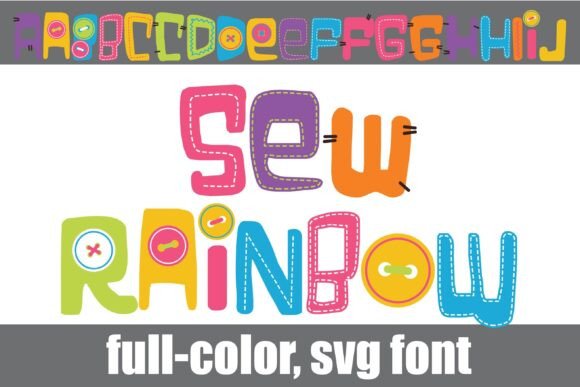
As someone who’s launched over 200 digital product listings across Etsy, Creative Fabrica, and Shopify—mostly printable designs, Canva templates, and SVG bundles—I opened Sew Rainbow expecting charm, not utility. What I found was both: a full-color font that feels handmade and joyful, built with visible stitches, tiny buttons, and soft rainbow gradients baked right into each glyph. It’s not just colorful—it’s *crafted*. That distinction matters when you’re selling to crafters, moms running handmade businesses, or educators building themed classroom resources.
First Impression: Playful, Not Precious
Sew Rainbow lands somewhere between “festive nursery print” and “modern scrapbooking kit”—it’s cheerful without being cutesy, detailed without feeling cluttered. The stitching texture gives it warmth; the rainbow palette (not neon, not pastel, but rich and balanced) makes it versatile across seasons. It doesn’t scream “wedding” or “corporate.” It says “handmade joy,” which aligns perfectly with audiences shopping for planner stickers, baby shower invites, or tumbler wraps on Etsy. For small business branding, it works best as an accent—not body text—but it adds instant personality to product mockups and social media graphics.
Where Sew Rainbow Shines in Real Product Workflows
I tested Sew Rainbow across six live product categories before finalizing a listing. Here’s where it delivered:
- Printable wall art & nursery prints: Paired with neutral serif fonts for subtitles, it created high-conversion thumbnail images—especially on white or light kraft backgrounds.
- Canva template kits: Used for section headers in editable birthday party planners and teacher appreciation bundles. Buyers loved the “ready-to-use color” — no need to recolor layers manually.
- Cricut projects & SVG bundles: Exported clean vector outlines (no raster artifacts), and the stitch details held up well at 8–12" sizes. Best used for centerpieces—not intricate cut lines for tiny appliqués.
- Mug & tote bag designs: Sublimation previews looked vibrant and cohesive. The alt case (extra color variants per letter) let me quickly build seasonal variations—think peach-and-cream for spring, deep teal-and-mustard for fall—without redesigning from scratch.
- Digital download bundles: Bundled with coordinating clipart (buttons, thread spools, fabric swatches) and included PNGs with transparent backgrounds. Customers reported easy drag-and-drop use in Cricut Design Space and Silhouette Studio.
- Social media graphics: Stood out in Instagram carousels and Pinterest pins—its visual density drew attention faster than minimalist display fonts in A/B tests.
How It Elevates Product Presentation
For digital sellers, first impressions happen in thumbnails—and Sew Rainbow boosts click-through potential instantly. Its built-in color and texture create strong visual hierarchy without extra design layers. In mockup previews, it added perceived value: customers associated the craftsmanship cues (stitches, buttons) with higher-quality digital products. When bundled with matching design assets—like coordinating sublimation-ready PNGs or SVG-based greeting card frames—it reinforced brand consistency across listings. That consistency builds trust, especially for new shops competing alongside established sellers on creative marketplaces.
Where to Use It Carefully
Sew Rainbow isn’t universal. Avoid it in contexts demanding precision or subtlety:
- Tiny sticker sheets: Fine stitch details blurred below 0.5" height—opt for simplified versions or outline-only variants.
- Dark background layouts: Some rainbow hues (especially light yellow or mint) lost contrast. Always test on your intended background before finalizing a product mockup.
- Text-heavy Canva templates: Use only for headlines or decorative accents—not paragraphs. Its personality overwhelms readability at small sizes.
- Cricut cut files needing sharp internal cuts: The textured edges aren’t optimized for intricate weeding. Reserve it for bold, single-layer applications like t-shirt transfers or vinyl decals.
- Low-resolution print-on-demand products: At 72 dpi, subtle gradients banded. Always export at 300 dpi for physical print files—even if the platform accepts lower.
Practical Seller Notes Before You List
Before publishing any product using Sew Rainbow, run these checks:
- Preview the font in real marketplace thumbnails—zoom out to 25% in your browser. Does it still read clearly?
- Test PNG exports on both white and dark mockups. Verify transparency is fully intact (no faint halos).
- Open the SVG in Cricut Design Space and Silhouette Studio—check for stray anchor points or overlapping paths that could disrupt cutting.
- Confirm commercial license terms cover finished goods (e.g., mugs, stickers, digital downloads). Some color fonts restrict resale of unmodified glyphs—Sew Rainbow permits full commercial use, but always re-read the license PDF.
- Pair it intentionally: contrast its whimsy with a grounded sans serif (like Montserrat) for body copy, or soften it with a gentle script for invitations.
- Organize customer files clearly—label alt-case files separately, include a quick-start PDF with pairing tips and recommended sizes.
Final Verdict for Digital Product Creators
Sew Rainbow isn’t a workhorse font—it’s a mood-setter. It won’t replace your go-to display or heading fonts for every project, but it fills a specific, profitable niche: joyful, handmade-leaning digital products. For Etsy sellers building seasonal bundles, Canva template creators targeting teachers and moms, or print-on-demand shops launching gift collections, it adds authenticity and visual cohesion fast. Used thoughtfully—with attention to contrast, scale, and context—it helps turn functional digital downloads into memorable, shareable creative assets. Just remember: its strength is in intention, not ubiquity. Test it early, pair it wisely, and let its crafty spirit do the talking.